januar 20, 2014
iPad blog flow
TL;DR - I've implemented a workflow for my Chisel log using a combination of Pythonista scripts and x-callback-urls enabling me to write, uploading and inserting images in posts and publishing all of it on a tiny Linux box.

This post is written in english because of the limited interest such a subject would have among a danish audience.
It is no secret that I have an affection of the simplicity of static blog generators; I have actually been using a few on this domain in the past.1 The simplicity of a system that I understand and can hack myself is worth so much for me as a hobby techie. Furthermore this setup is portable (can easily be moved to a new host or system) and secure (no active components - apart from the webserver, that is - to be maintained).
The flow
The goal is to be able to create and publish full length post - including images - using only my iPad. To do that I need to identify each step in my logging flow and support each step in a way that not only make it technically possible but also easy to use - well as easy as it can with the setup I have chosen anyway.
The steps in my workflow is as follows:
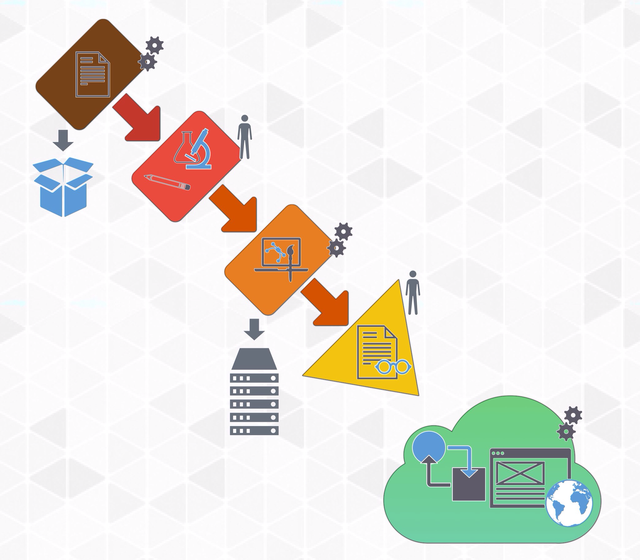
- Creating a well formed draft: The system I use relies on markdown documents with a certain naming convention and some meta data at the beginning of the file. Candidate for automation.
- Writing / researching: Personal posts is typically written from memory or notes written on my iPhone. Technical posts (like this), is mostly researched in a webbrowser and some form of note taking app; often right within the draft itself. Manual action.
- Inserting images: This is not stritcly necessary, but posts with images does look better and in som cases it adds to the understanding of the contents. It is something that I really wanted to be able to do from my iPad. Candidate for automation.
- Proofreading: I write in markdown. Markdown is - even though it is a markup format - highly legible so a good plain text editor is all I really need. Manual action.
- Promoting from 'draft' to 'post': My markdown files resides in two different folders; a drafts folder af a posts folder. The folder a given file is in determines its fate when the site is being generated. Candidate for automation.
- Generating site: Since I use a static site generator that produce a hierarchy of html files, I need to generate the site anew every time I publish a post. Within a minute of a regeneration of the site changes are live. Candidate for automation.
So the workflow ends up looking like this (note the gears that indicate an action that is being automated):
The scripts
All the scripts are subject to changes and improvements which is why I don't post them here, but link to them instead.
- New post takes a post title as input and outputs a new well formed post in Byword via an x-callback-url.
- Insert image lets you choose an image from the camera roll on your iOS device, scales it to fit the width of my log, uploads it to an ftp and returns a markdown formatted image link.
- Promote drafts simply logs on to my linux server and copies all drafts to posts.
- Generate log logs on on to the aforementioned server and generates the site with Chisel.
Each of these scripts is written and run in Pythonista on an iPad or even on the iPhone or iPod.
Round-up
The setup does exactly what I set out to acheive. It enables me to write effortlessly from my iPad. I actually have no need to pull out my MacBook Pro anymore - only if I have to edit the posts after they have gone online.2 After I bought an iPad mini (retina) and a bluetooth keyboard / stand I find myself using the Mac less and less.
Ease of use - Medium. This must be evaluated against other iOS-publishing methods, and while there certainly are easier ways to get content online; I have yet to see an easier - or perhaps more transparent - setup for a self hosted site build with a static site generator. Each step in my flow is under my control; right from the server that hosts my content over the tool I use to generate the site to the scripts I use to control this setup with. But that wont make it easy to understand for any non techie. When set up it is pretty straight forward to use - especially if you execute the scripts via x-callback-urls with an app like Launch Center Pro.
Geek factor - High. Generating static html from the commandline, managing your own server and scripting (or adapting scrips to) your setup is definitely not for everybody. You have to want to tinker. For everybody else there is loads of online services that does the job of getting your content online faster and easier.